Every truck and machine. What's due. What's been done.
Iron Clipboard keeps the service records for everything you own that has an engine, a hitch or an hour meter. It tells you what's coming due before it's late, and logging the work takes seconds on your phone, even with no signal.

No credit card. Your whole crew, or your whole family, at no extra cost. Android app coming soon.
For anyone who takes care of their equipment
From a contractor with forty machines to a homeowner who wants every oil change on record, Iron Clipboard keeps the same careful logbook.
Small businesses
Keep the whole yard running and stop paying for missed services. The crew logs from their own phones, and the office sees it all.
Farms and ranches
Tractors by hours, trucks by miles, implements by the season. One list for everything on the place, shared with whoever helps.
Homes and garages
If you keep a notebook in the glovebox and every receipt in a folder, this is for you. Your family's vehicles and toys, all in one place, with the history to prove it when you sell.
Sound familiar?
Most maintenance lives in someone's head. That works until it doesn't.
"When was that done?"
The history is on a greasy clipboard, a glovebox receipt, a sticker on the windshield, or with the one person who remembers.
Missed services
An oil change slips a few thousand miles, and a cheap job turns into an engine, a transmission or a blown hydraulic pump.
Software that's too much
Fleet tools charge per user or per truck, take weeks to set up, and nobody opens them. Spreadsheets don't remind you of anything.
How it works
Your first unit and its first reminder in under five minutes. No training day.
Add it
Pick what it is (there are over 45 kinds, from pickups and snowblowers to bush hogs, balers and other attachments) and its usual service schedule fills in for you. Type the VIN and the year, make and model fill in too.
Log it
Tap the yellow + or scan the unit's QR tag, tap what was done, and Save. The reading and the parts are already filled in. Add a photo or the cost if you like.
Stay ahead
Home shows what's Down, overdue and due soon. A morning email and phone notifications remind you before a service slips, not after something breaks.
See it in action
Big buttons, plain words, dark screens that read in the sun. Made for people who'd rather be working.
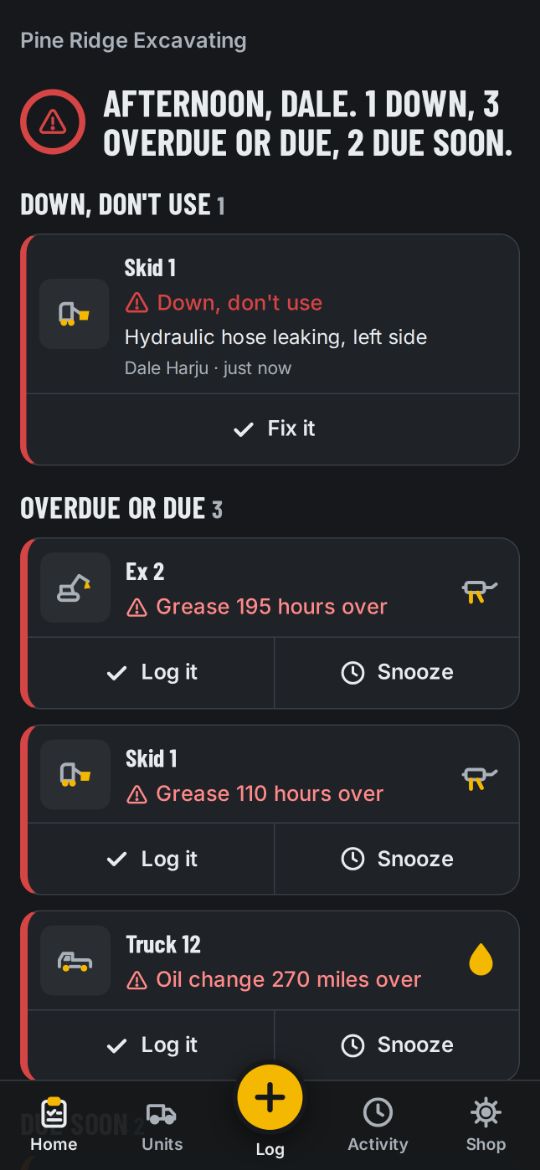
What's due, at a glance
Open the app and you know where everything stands in three seconds.
- Down, overdue and due soon, sorted for you
- By miles, hours or the calendar, whichever comes first
- Predicted due dates from how much each unit is actually used
- Log it or snooze it right from the list
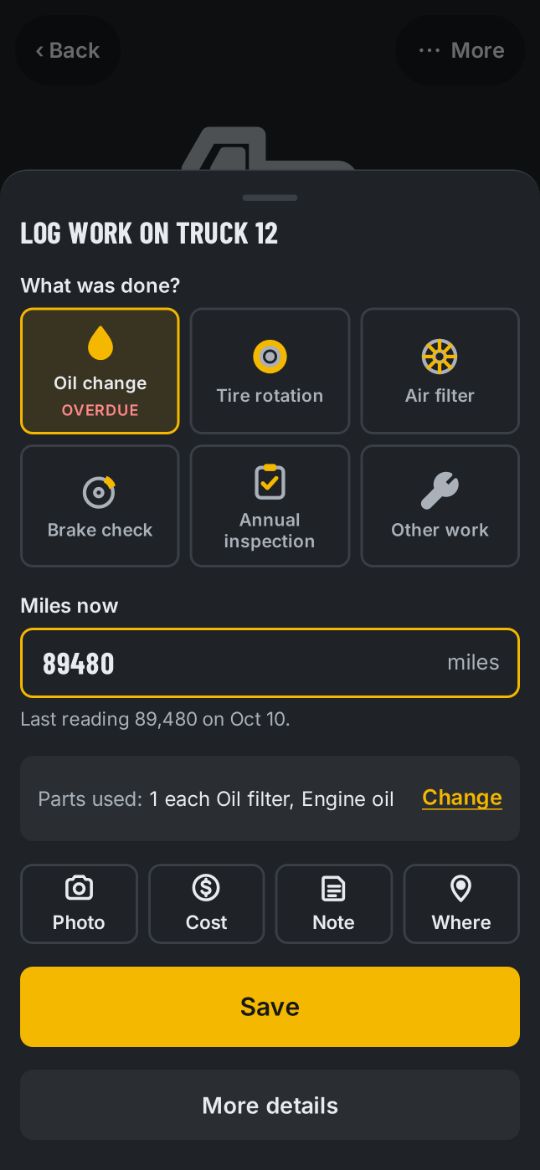
Log work in seconds
One sheet, a few taps, one Save. Fuel, readings, problems and pre-use checks are just as quick from the yellow +.
- The reading and parts used are filled in from the schedule
- Add photos, the cost, a note, or the outside shop that did it, with their PDF invoice
- Works with no signal; it sends by itself when you're back in range
- Nothing is lost if the phone dies halfway through
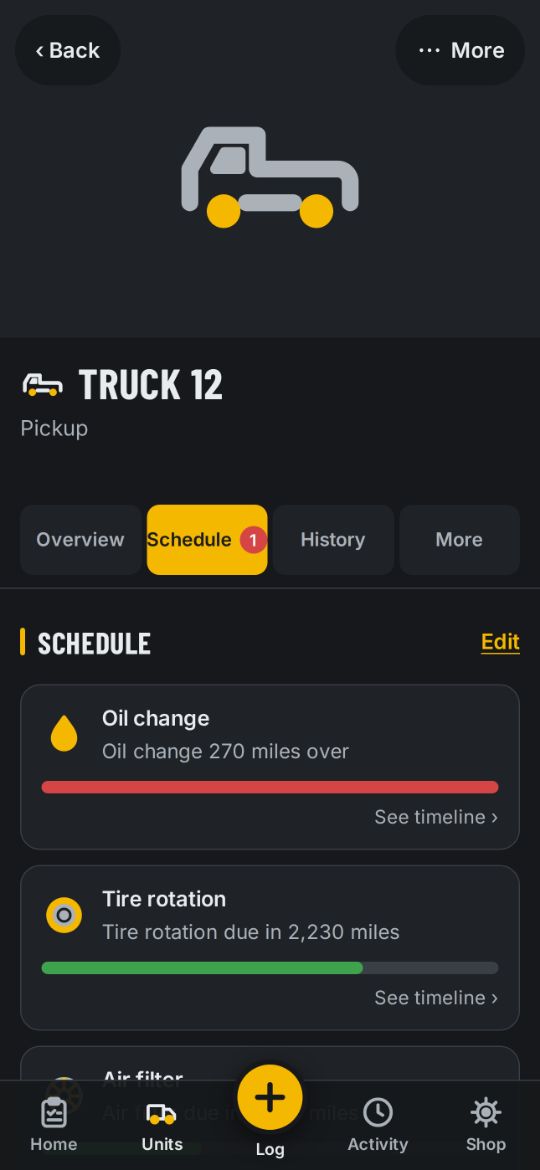
Every unit's whole story
Each truck, trailer or machine has its own page: schedule, history, problems, fuel, documents and where it was last seen.
- A progress bar for every service on its schedule
- Full history with photos, PDF invoices, parts and who did the work
- A printable history report for resale, insurance or an inspector
- Save its schedule as a template for the next one like it
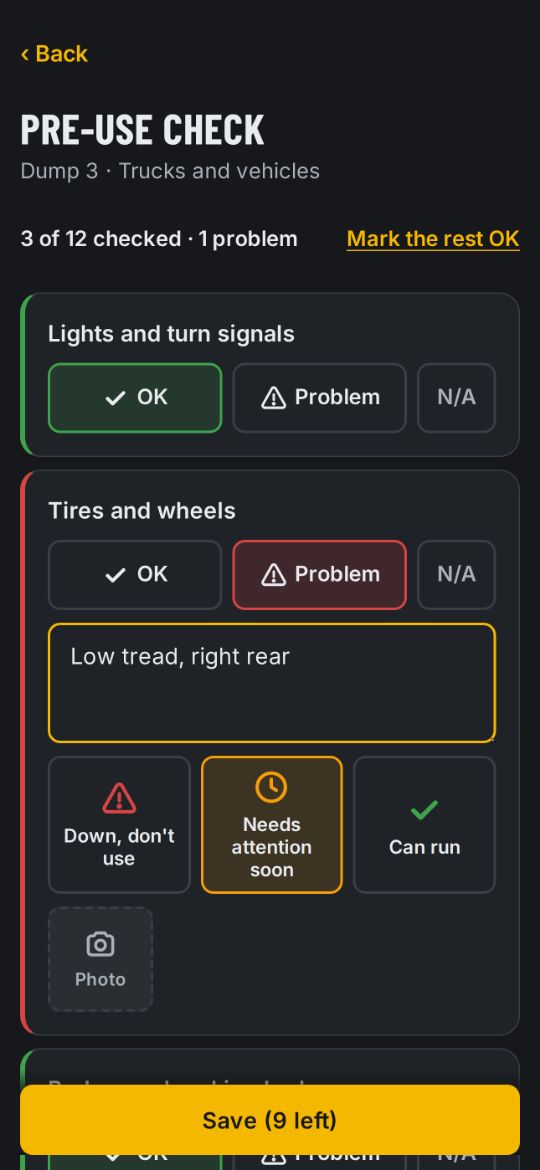
Pre-use checks
The daily walk-around before a unit goes out (a DVIR for trucks), one tap per item.
- OK, Problem or N/A for each item, or mark the rest OK
- A problem found becomes a problem report, with a photo
- Checklists for vehicles, equipment, small engines, trailers and attachments, and you can edit them
- Home shows which units were checked today, by whom, and which still need theirs
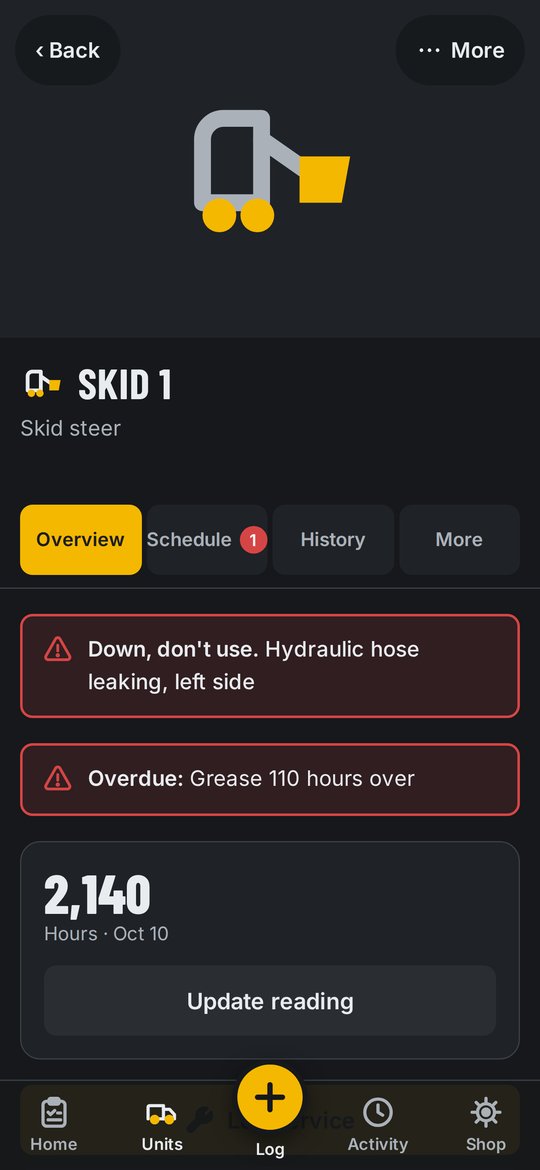
Down? Everyone knows
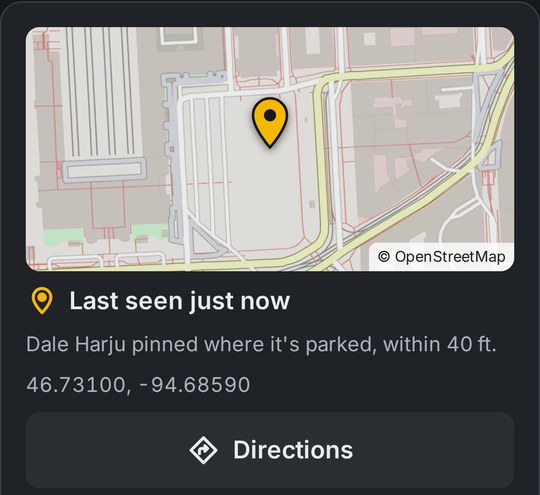
Anyone can report a problem in a few taps. Mark it "Down, don't use" and the whole crew is told right away by phone and email, with directions to where it is.
- Can run, needs attention soon, or Down
- Fix it from the report, and the fix goes in the history
And a whole lot more
Everything below comes with every plan, including the free one.
Fuel
- Fill-ups in a few taps, with the reading at the pump
- Fuel economy: miles per gallon or gallons per hour
- Price per gallon and where you filled up
Parts
- Parts and fluids list with brands, part numbers and vendors
- Stock on hand, used up automatically as work is logged
- Shopping list for what's coming due in 30 days, 90 days or a year
Documents
- Registration, insurance, DOT inspection, permits and warranties
- A reminder before each one runs out
- A photo or PDF of the paper, always in your pocket
Costs
- Cost per unit, and per mile or per hour
- Parts, outside shops and fuel all add up for you
- Know which machine is worth keeping
QR tags
- Print a sheet of tags with your logo and stick one on each unit
- Scan it with any phone camera to open that unit
Reminders
- Morning summary email: what's Down, overdue and due this week
- Phone notifications, with quiet hours you choose
- An extra nudge when something stays overdue
Your people
- Unlimited people on every plan
- Owner, mechanic or operator: each sees what they need
- Invite by text or email in one tap
- Remove someone when they leave; their work keeps their name
Where it is
- Last seen on a map, saved when work is logged
- Directions to it in one tap
- The owner can turn it off
Your records, your way
- Export everything to Excel or CSV any time
- A full desktop layout with sortable tables for the office
- Sign in with Face ID or a fingerprint
Built to be trusted
Records are only worth keeping if they're there when you need them.
Never lose a record
Every entry is saved on your phone first, then sent. No signal, dead battery, closed app: it's still there.
Works with no signal
Out on a job site or back of the property, everything works, photos included.
Your data is yours
No ads, nothing sold, and you can download all of it whenever you want.
Phone or computer
The same records on iPhone, Android and any computer. The iPhone app is on the App Store, and the Android app is coming soon.
Simple, flat pricing
Every plan has every feature. Plans differ only by how many units they hold. Retired units don't count, so you never pay to keep history.
Every plan
- Every feature
- Unlimited people
- Works with no signal
- Phone and computer
- Export any time
- No contract, cancel any time
Start on Starter for free, then choose a bigger plan in the app when you need more units. A bigger plan counts right away.
Questions
Can I use it for my own vehicles at home?
Yes. Plenty of careful owners keep every oil change and receipt on record. Add your cars, trucks, boat, camper, mower, snowblower and anything else with an engine. Three units are free forever, and the whole family can use it at no extra cost.
What counts as a "unit"?
Anything you maintain: a truck, trailer, tractor, piece of equipment, an attachment like a bush hog or auger, a generator, mower or boat. People are always unlimited. Retired and deleted units don't count toward your plan.
Does it work without signal?
Yes. Everything, including photos, is saved on the phone first and sends by itself when there's signal again. Nothing is lost.
Do I need to download an app?
On an iPhone, get Iron Clipboard on the App Store. On Android or a computer, it runs in the web browser, and you can add it to your home screen like an app. The Android app is coming soon.
Is there a contract?
No. Pay month to month or yearly, and cancel any time. A canceled plan lasts until the end of what you paid for, and your records stay.
What happens to my records if I stop paying?
Nothing is deleted. The account goes back to Starter. Every unit and record stays, and you can export all of it to Excel whenever you want.
Who's building this?
Iron Clipboard is built in Michigan's Upper Peninsula by Nye Built, LLC, by people who run shops, turn wrenches and have kept equipment alive on paper logs for years. Questions or ideas: hello@ironclipboard.com.
Put your first unit on the clipboard
It takes less than five minutes, and the first three units are free.
Already have an account? Sign in